Several years ago I started using remind to generate a printed out calendar each year. I include things like trash/recycling pickup, when I get paid, important dates for friends and family like birthdays, anniversaries, when clocks change, and fun things like how old our cars are.
I have everything setup to generate the calendar on a PC in the house, but this year I decided I wanted to make a podman container to run remind and generate the PDF. Why? Because my current desktop is running bazzite, and while I can install remind using brew, due to other dependencies it didn’t include the rem2pdf helper. So here is what I did 🙂
My Containerfile:
FROM debian:stable-slim

RUN apt-get update
RUN apt-get install -y remind poppler-utils nvi
Then to build the container:
podman build -t myremind .
And finally to build the PDF:
podman run -v ~/.reminders:/root/.reminders:Z -v ~/Documents:/root/Documents:Z myremind /root/.reminders/update.sh
This uses my local users ~/.reminders directory, mapping it to the /root/.reminders directoring in the container, and doing the same thing with my Documents directory, running the update.sh script that actually does all of the work.
#!/bin/dash

if [ "$#" -eq 0 ];then
    YEAR=$(date +%Y)
else
    YEAR=$1
fi

for i in $(seq 1 12);do
    DATE=$(date --date="${YEAR}-${i}-1" +'%b %Y')
    ODATE=$(date --date="${YEAR}-${i}-1" +'%F')
    remind -pp ~/.reminders ${DATE} | \
# rem2ps -c2 -e -l -sd 15 -se 12 | \
    rem2pdf --small-calendars=2 \
        --fill-page \
        --landscape \
        --entry-font=Helvetica \
        --title-font=Helvetica \
        --small-cal-font=Helvetica \
        --daynum-size=15 \
        --entry-size=9 \
        --margin-top=36 \
        --margin-bottom=0 \
        --margin-left=18 \
        --margin-right=18 \
        > "${ODATE}.pdf"
        # -c2 -e -l
        # ps2pdf - "${ODATE}.pdf"
done

pdfunite ${YEAR}-*.pdf ${YEAR}_full.pdf
cp ${YEAR}_full.pdf ~/Documents/
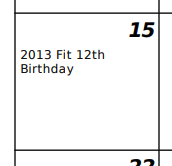
All of this results in a 12 month calendar that takes a minimum amount of effort to update. For example, in my house.rem file for my car’s birthday I have a single line:
REM Mar 15 MSG 2013 Fit [since(2014)] Birthday%